Letting an assistant remember things saves you from explaining your setup at the start of every session. It also means that whatever it writes down will be read back later, in a conversation you have not had yet, possibly by a different tool. That second part is the one to plan for.
A memory is not a transcript and not a scratchpad. It is a short fact that the assistant will treat as true the next time it sees a related task. So the useful question is not "would this be handy to keep" but "do I want this stated as fact, unprompted, in a future session?"
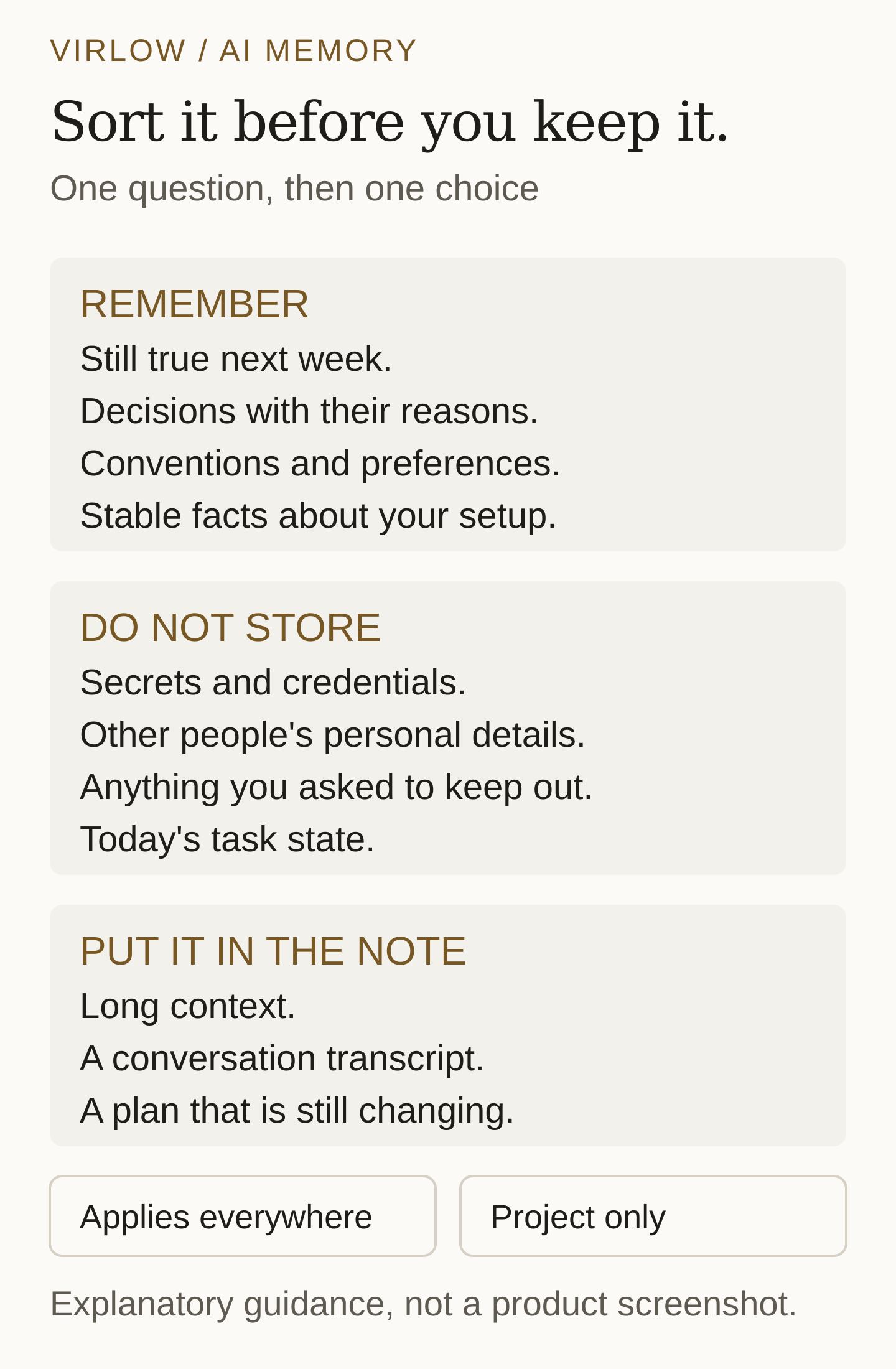
A memory is a fact that will still be true next week
The facts worth keeping are the ones you would otherwise re-explain: a decision and the reason behind it, a convention your project follows, a preference about how you like things done, or a stable detail of your environment. "The marketing site deploys only from a version tag, never from a merge" is a memory. "I am halfway through fixing the sidebar" is not.
Unfinished work belongs in the note about that work, where you can see its status change. Written as a memory, it becomes a claim that is wrong the moment you finish, and the assistant has no way to know that.
A good test is to imagine reading the memory in a month, with no other context. If it still tells you something you would want to act on, keep it. If it only made sense on the day, leave it out.
Keep out secrets, and anything you would not want repeated
A memory is a place where a fact gets repeated, not a safer place to store it. Passwords, access tokens, account numbers, and private keys have no business there, however convenient it would be for the assistant to have them. The same goes for other people's personal details, health information, and anything you have asked the assistant to keep out.
If you would hesitate to paste the sentence into a message to a colleague, do not let it become a memory. The assistant cannot judge which facts are sensitive from context alone; it will store what the conversation suggested was useful. Set the boundary yourself, in advance.
Give project facts a project scope
Some memories are about you: how you like a summary written, which spelling you use, what to check before saying a task is done. Those should apply everywhere. Others are about one project: which server hosts it, what was decided in June, why a particular library was rejected. A decision from one project stated as fact in another is a quiet way to be wrong.
Virlow keeps memories in a Memories workspace, grouped by project. A memory saved without a project applies everywhere; a memory saved for a project is labeled with that project. In the Claude Code and Codex plugins, the project is named after the repository you work in. When an assistant records something, choosing the scope is part of the fact.
Write the fact, not the conversation
Each memory has a short label and the fact itself. Write both so that someone arriving cold can use them. "Deploy route" is a poor label; "Marketing site publishes from a version tag only" is a better one, because the label alone already says most of what matters.
In the text, include the reason when there is one. A decision without its reason is hard to revisit: you cannot tell whether the conditions that justified it still hold. Where a date matters, write the date in the fact rather than relying on when the memory was created.
Keep it short. A memory that runs to a page is a note that was filed in the wrong place. If the assistant needs long context, it should read the note; the memory can say which note.
Review what was written
Memories are only as trustworthy as your last look at them. In Virlow they are stored as encrypted notes in the Memories workspace, so you can open one like any other note and delete one you no longer want the assistant to see. The feature is off by default, and an assistant can only store or read memories while your vault is unlocked.
Saving new memories and editing existing ones is part of Virlow Pro. On the free plan, the memories you already have stay readable, searchable, exportable and deletable, and your assistant can still recall them.
What I learned lists this week's memories by day, with the facts that stopped being true. Each one has an Undo that moves it to the Trash, where you can restore it. Two switches pause saving: one for everything, and one for the project you are in. Recall keeps working while saving is paused.
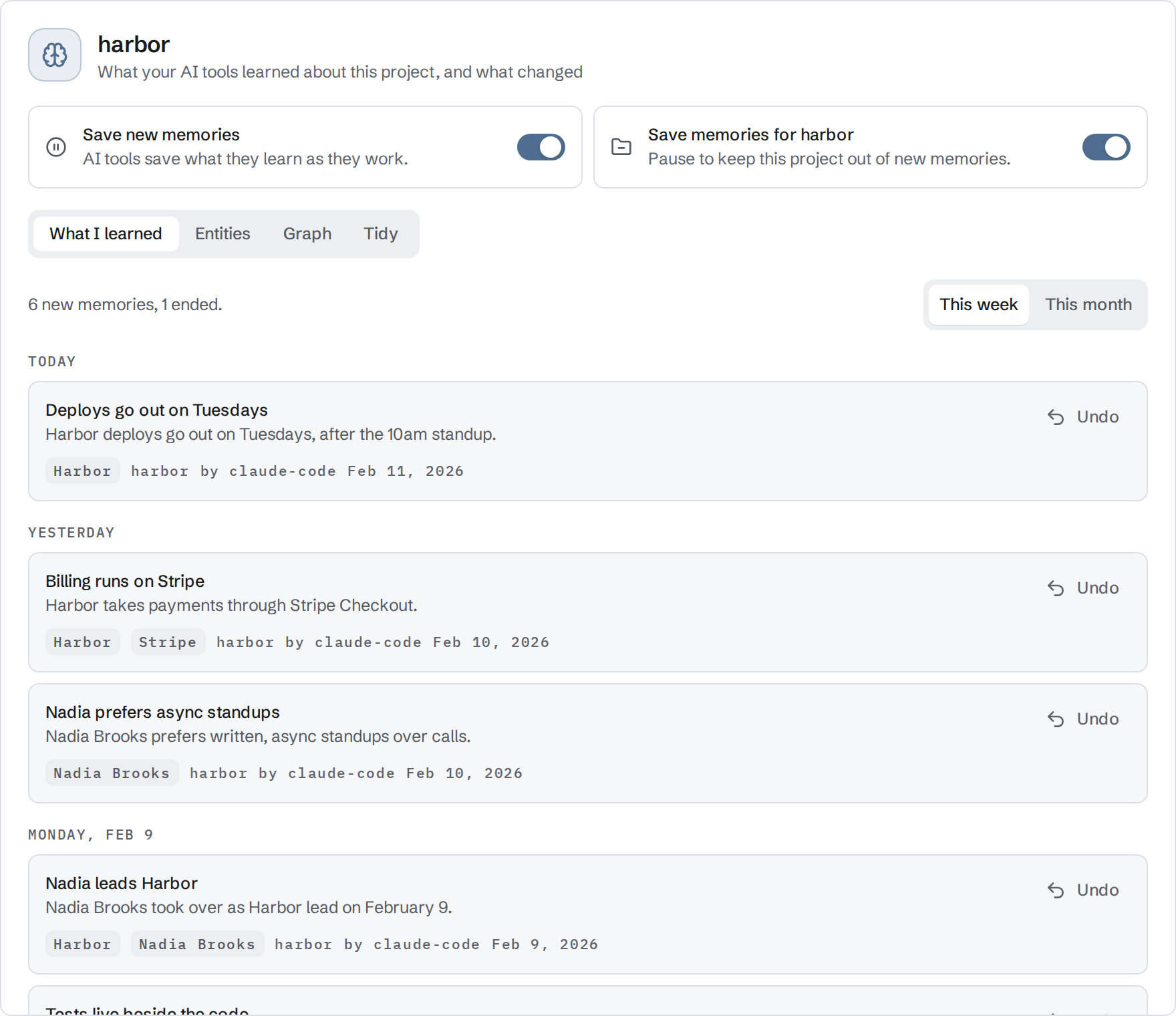
Read through them occasionally, and always after a long working session. Look for facts that have expired, for two memories that now contradict each other, and for anything that should not have been written down at all. Removing a bad memory is the whole fix; nothing else has to change. If you send notes as well as memories to an assistant, what happens to private notes when you connect an AI assistant covers who can read what during a session.
A fictional example
The project and every detail below are invented. This is an example of sorting, not a record of a specific assistant's behavior.
At the end of a session, an assistant proposes to remember this:
Working on the Harbor booking service. Rui prefers short answers.
Production database password: (an actual credential, not reproduced here).
Halfway through migrating the bookings table to the new schema.
Decided to keep the payment provider for now because switching
would cost two weeks and the fee difference is small.
After sorting, three memories survive and one line is refused:
[Applies everywhere]
Label: Prefers short answers
Text: Prefers short answers first, with detail available on request.

[Project: Harbor]
Label: Payment provider stays for now
Text: Decided in September 2026 to keep the current payment provider.
      Switching was estimated at two weeks and the fee saving was small.
      Revisit if either estimate changes.

[Project: Harbor]
Label: Bookings schema migration is in the project note
Text: Migration status lives in the note "Bookings schema migration".
      Read that note for current state rather than assuming.

Refused: the database password. Credentials are never stored as memories.
The migration progress did not become a memory; a pointer to the note that tracks it did. The decision kept its reason and its date, so it can be revisited on evidence rather than on habit.
A checklist
- Before agreeing to a memory, ask whether it will still be true next week. If not, it belongs in a note.
- Refuse secrets, credentials, and other people's personal details, and anything you have asked to keep out.
- Choose the scope: does this apply everywhere, or to one project?
- Check the label and the text read correctly without the conversation that produced them. Add the reason and the date where they matter.
- After a long session, open Memories, read What I learned, and remove what is wrong or should not be there.
Memory is most useful when it is small and trusted. A dozen facts you would stand behind beat a hundred you have never read.