You connect an assistant because you want it to use something you have written. Perhaps you need a summary of your research or a list of unresolved questions from your project notes. For that to work, the assistant must receive readable content.
That step matters even when the notes are encrypted in storage.
Stored notes and shared answers are different things
In Virlow's ordinary sync flow, private note titles, bodies and files are encrypted on your device. Folder names and note tags are readable by the service. An AI connection adds a way to request note content through tools.
When a tool returns a note to an assistant, the assistant receives plaintext: the readable words rather than an encrypted blob. Its provider may receive those words too. Encryption of the stored note does not control how that provider handles an answer already sent to it.
Before connecting, check the data policies of the particular client and provider you intend to use. Do not assume a note stays on your device merely because you choose a local connector.
Where unlocking happens
The local connector runs on your computer. It can decrypt notes there and return the requested content to your AI client. Keeping the key local does not mean every tool result stays local.
The hosted connector runs on Virlow's servers. While a hosted session is unlocked, the server can decrypt notes. That is a different trust boundary: server-side access to the session key is part of the choice.
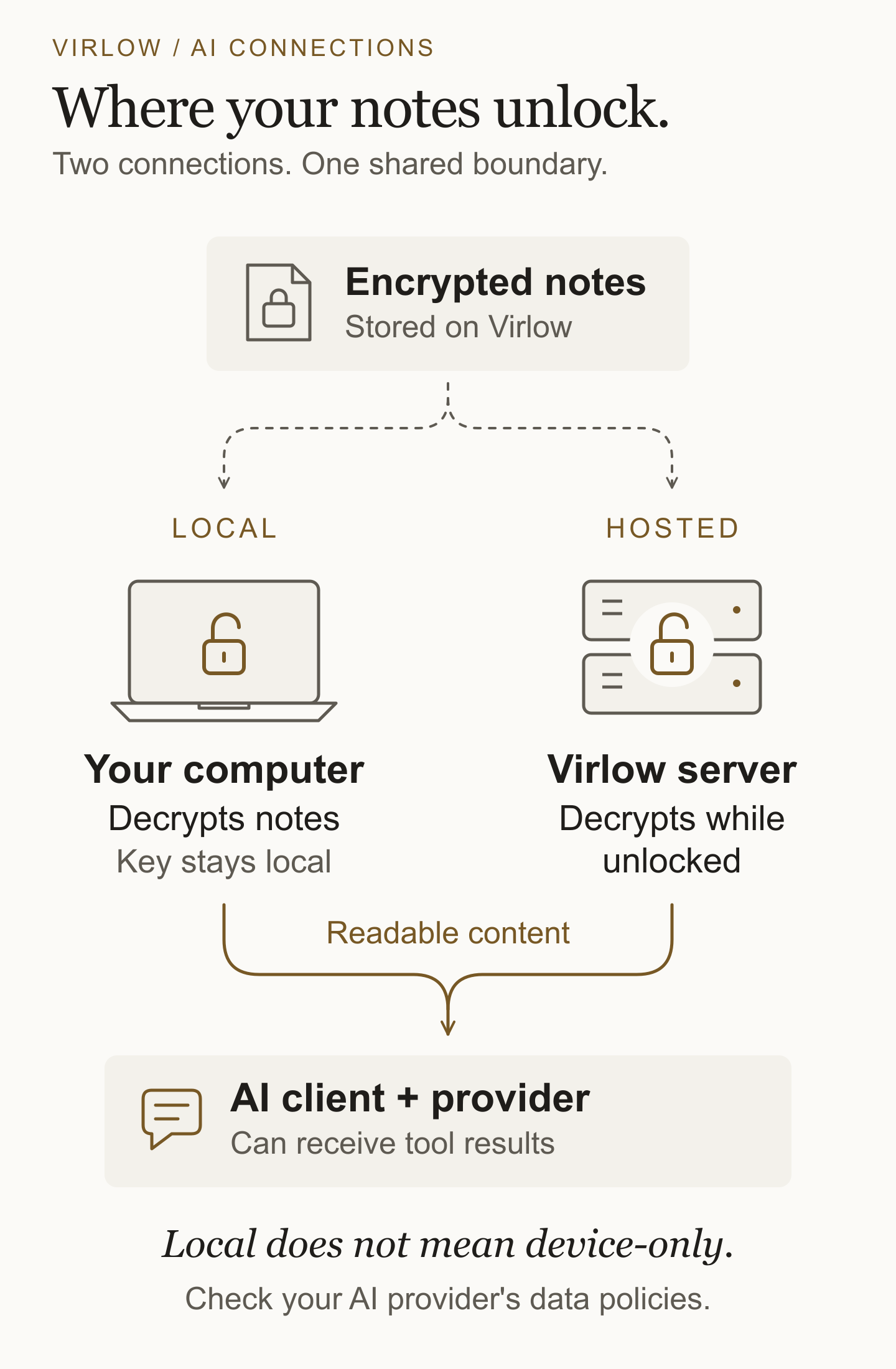
Neither path should be described as an arrangement in which an authorized assistant can summarize a note without seeing its contents. The connection guide explains both paths and their limits.
A careful prompt is not a permission setting
Starting with a request that changes nothing is useful. It makes the first result easier to check. But asking an assistant to behave read-only does not remove the connector's write tools.
Review tool calls through the client's approval controls. Keep your first test limited to non-sensitive sample notes, and do not broaden access just because a search returns nothing.
Virlow's folder exposure controls are not a per-note sandbox. An exposed parent includes its subfolders, and the Memories tree has a separate opt-in. Hiding a note removes it from list and search results; an exposed hidden note can still be read by its exact ID.
Disconnecting does not recall a conversation
Locking stops an unlocked session from continuing to decrypt notes. Revoking a connection is a separate action. Use the appropriate controls, then check the resulting state rather than assuming the change succeeded.
Content already received by an assistant is another matter. Disconnecting does not erase it from the conversation or the provider's systems. History, logging and retention depend on the client and provider.
Before your first request
- Choose a non-sensitive test note.
- Understand whether decryption will happen locally or on the hosted server.
- Check folder exposure and any separate AI memories opt-in.
- Review your AI client's approval controls and its provider's data policies.
- Know how to lock the session and revoke the connection when finished.
For the setup steps, use the maintained AI connections guide. Read the security model and privacy policy before deciding which notes belong in an AI conversation.