A coding session ends, and most of what you explained during it ends with it: why the deploy works the way it does, which library you ruled out, how you like a change described. The next session starts by asking again.
Virlow for Codex is a plugin for OpenAI Codex that makes memory part of the routine. Codex checks what Virlow already knows about the project at the start of a task, and it is reminded once to save what is worth keeping before it stops. Each memory is an encrypted note in your Virlow vault, so you can read every one of them yourself.
Install it from GitHub
You need Node.js 20 or later and a Virlow account. The plugin works in Codex CLI and in Codex in the ChatGPT desktop app. The Codex IDE extension does not support plugins.
Add the plugin's repository as a marketplace:
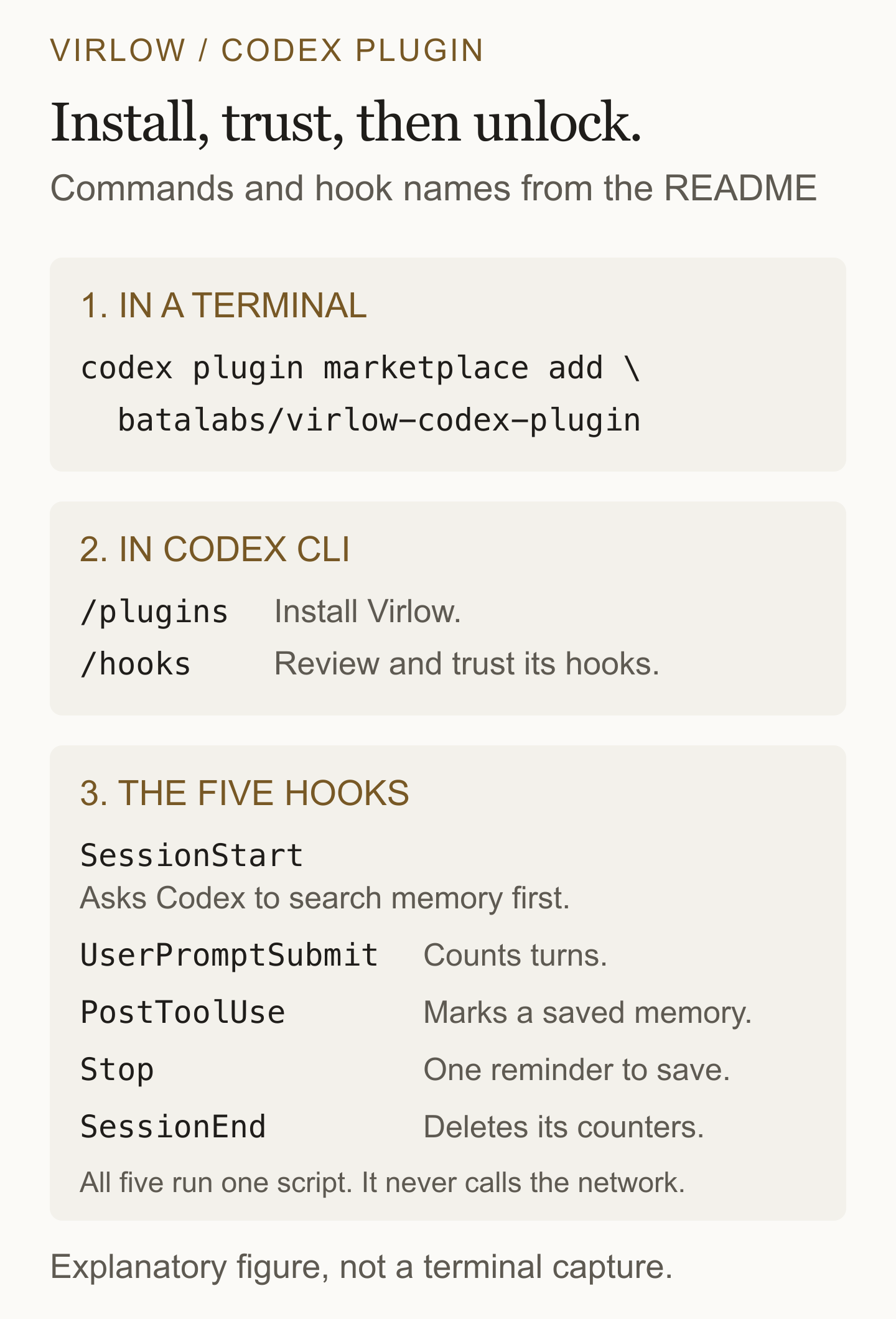
codex plugin marketplace add batalabs/virlow-codex-plugin
Then install it. In Codex CLI, start codex, type /plugins, switch to the Virlow marketplace tab, open Virlow and install it. In the desktop app, open the Plugins Directory and choose the Virlow marketplace. Start a new Codex session afterward so the skills, the connector and the hooks load.
The plugin installs from its own repository because it uses lifecycle hooks, and plugins with hooks are not listed in the public plugin directory. The repository is public so you can read everything the plugin runs.
Trust the hooks, then unlock
Codex does not run a plugin's hooks until you have reviewed and trusted them. In your first session, type /hooks, look over the five Virlow hooks, and trust them. All five run one script. Codex asks again whenever a hook definition changes in an update. If you do not trust them, the connector and the skills still work. Memory is just less automatic.
Next, ask Codex to unlock Virlow. The connector opens a form in your browser. Sign in to your Virlow account, complete two-factor authentication if it is on, and enter your master password there. Never type your master password in chat or put it in a configuration file. The encryption key is derived on your machine, and your master password is not sent to Virlow's API. Ask Codex to call status to check which account is unlocked.
Memories are opt-in. In Virlow on the web, open Settings → Security and turn on AI memories. Saving and editing memories is part of Virlow Pro. On the free plan, memories you already have stay readable, searchable, exportable and deletable, and Codex can still recall them, but it cannot save new ones or update them.
What the five hooks do
SessionStarttells Codex this project's memory namespace, which is the git repository's folder name or the working folder's, and asks it to callsearch_memoryat the start of a task.UserPromptSubmitcounts the session's turns. It adds nothing to your prompt.PostToolUseruns afteradd_memoryorupdate_memoryand marks the session as having saved a memory.Stopchecks those two things. If the session had at least three turns and saved nothing, Codex is asked once to save anything durable before it stops. It fires at most once per session and cannot loop.SessionEnddeletes the session's counters.
The plugin also includes the Virlow connector, a local MCP server started with npx -y virlow-mcp@latest, and two skills. The virlow-memory skill tells Codex when to recall and when to save, to say Saved to Virlow: ... each time it saves, to respect "don't remember this", and never to store secrets. The tidy skill links, merges and resolves your memories when you ask Codex to tidy them.
What the hooks do not do
The hooks are one small script with no dependencies. According to the plugin's README, it:
- never reads the session transcript,
- never calls Virlow or any other network service,
- never sees note content, memories, your master password or any key,
- keeps only a turn count and two flags per session, and deletes them when the session ends,
- never fails a turn. On any error it exits quietly and adds nothing.
All reading and writing of memories happens in the connector, on your machine, through its tools. The connector refuses to save anything that looks like a password, a key or a card number.
One boundary stays the same as with any AI connection. Codex and its provider receive the readable content that the tools return, even though the key stays on your computer. What happens to your private notes when you connect an AI assistant explains that in more detail. For notes, the connector reaches only the workspaces where you turned on Expose to MCP.
Where the memories go
Memories are grouped by project, named after the repository you work in. Each one is an ordinary encrypted note under Memories in Virlow, where you can open it and delete it if it is wrong.
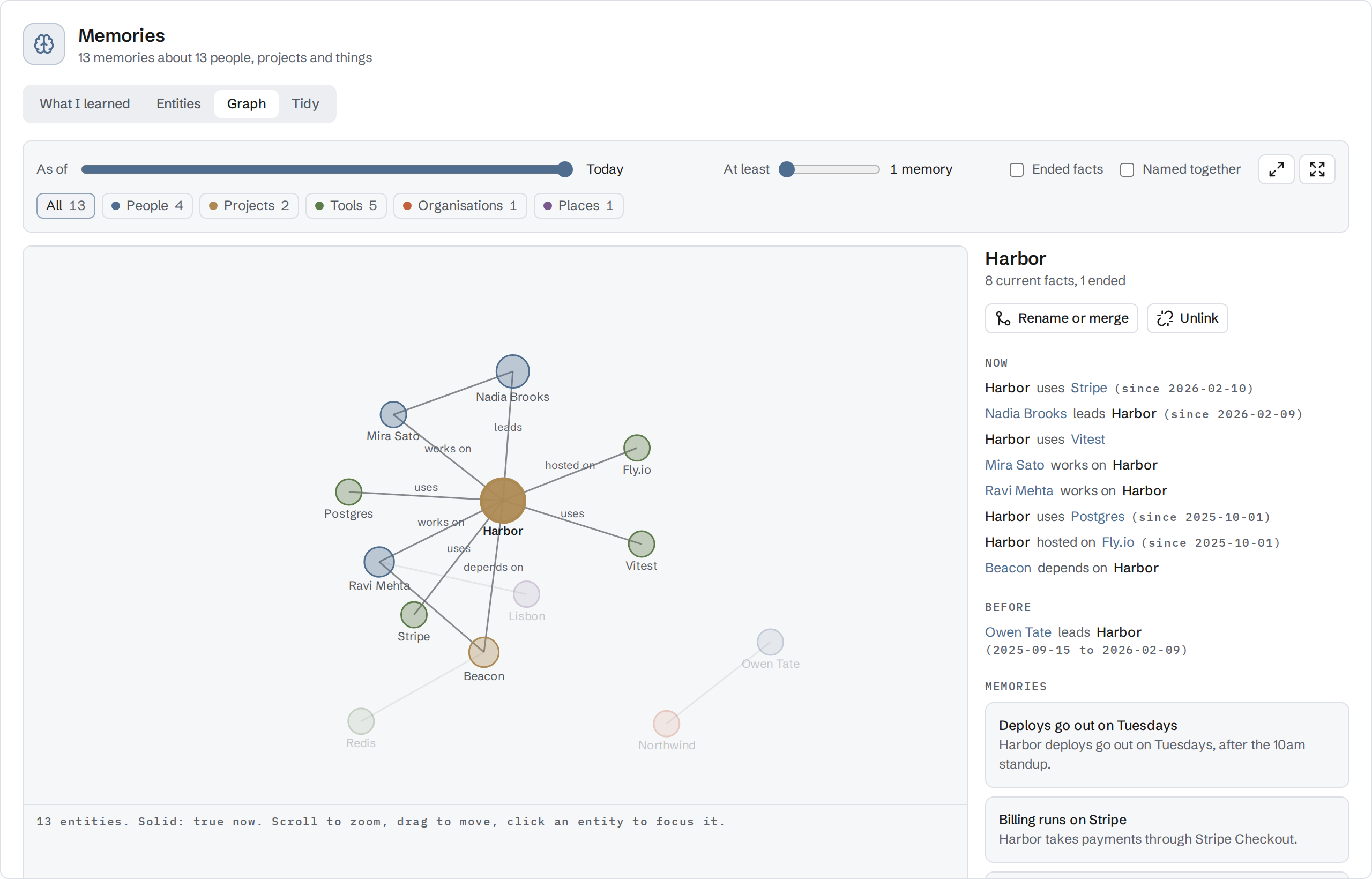
The graph is part of Pro. It draws the people, projects and tools your memories name, and keeps a fact that stopped being true as history instead of overwriting it. The Memories page shows the rest.
What Codex saves is still your decision. What to let an AI assistant remember about your work is a short guide to choosing.
Turn it off, update, or remove it
Set VIRLOW_MEMORY_HOOKS=off before starting Codex to turn the automatic memory hooks off and keep the connector and the skills. To turn off a single hook, use /hooks.
To update, run:
codex plugin marketplace upgrade virlow
Then start a new session. If a hook changed, Codex asks you to review it again.
To uninstall, open /plugins in Codex CLI, open Virlow and choose Uninstall plugin. Uninstalling removes the plugin from Codex. Your notes and memories stay in Virlow until you delete them there.
The AI connections guide has the maintained setup steps.