Copying a paragraph from one note into another feels like a favor to your future self. The fact is right there, no need to go looking. Then the original changes, the copy does not, and a month later you are reading two notes that disagree with each other and cannot tell which one to trust.
A link solves a different problem than a copy does. A copy says "here is what the other note said at the time." A link says "the answer lives over there, go and read the current version." Most of the time the second is what you actually want.
Give each fact one home
Decide which note owns a fact, and let every other note point at it. The room capacity belongs in the venue note. The decision to run two sessions instead of one belongs in the project note where the decision was made. A meeting note that needs either of them links out rather than restating them.
The owner is usually the note where the fact would be updated first. If the venue emails a new capacity, you will open the venue note, not the six meeting notes that happened to mention the number. When the owner is the only place the number is written down, updating it once is enough.
If you cannot decide which note owns a fact, that is worth noticing. Often it means the fact does not yet have a home, and a short reference note would give it one.
Link from the sentence that needs the fact
Put the link where the reader will need it, inside the sentence, rather than in a list of related notes at the bottom. "Capacity is confirmed in the [venue note]" tells the reader where to look and what they will find. A bare list of titles at the end of a note asks them to guess.
In Virlow, typing [[ in a note opens a picker of your notes; typing @ opens the same picker and also offers dates, which go in as plain text. Choosing a note inserts a link that shows the note's title and opens it when clicked. The link follows the note itself, not its position in a folder, so filing the target somewhere else later does not break it.
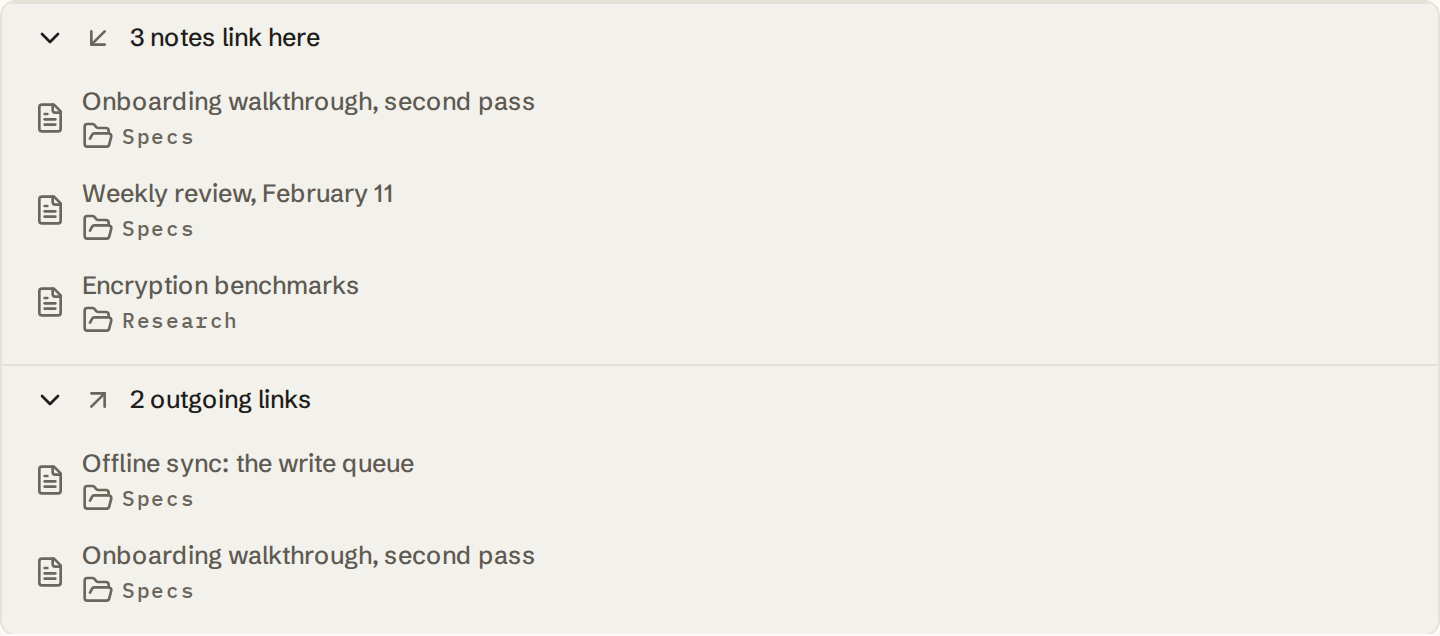
Read the backlinks before you change a note
A copy hides its readers. Nothing in the venue note tells you that six meeting notes quoted the old capacity. A link makes them visible: the notes that link to a note are the notes that depend on it.
So before rewriting a fact, look at who links to it. Some of those notes will be fine with the change. Some record a decision that was made on the basis of the old value and should say so. Backlinks turn "I hope nothing else relied on this" into a short list you can actually check.
Virlow lists, under each note, the notes that link to it and the notes it links out to. That list is built on your device from your unlocked notes. While the vault is locked there is nothing to read, so the list is empty until you unlock.
When a copy is the right choice
Sometimes you need what the other note said at a particular moment, not what it says now. A quotation you are responding to, the figure you reported in a filing, or the wording of an agreement as it stood when both sides signed: these should not silently update when the source does.
Copy in those cases, and label the copy as one. "Copied September 12 from the venue note; capacity may have changed since" tells the reader exactly how much to trust it. An unlabeled copy looks like a current fact, which is the problem you were trying to avoid.
External sources are a copy of a different kind. If the fact came from a web page or an email, record where, and quote the part you relied on. A link to a page you do not control can stop working; a short quote with its source keeps the record usable.
A fictional example
The event, the venue, and every detail below are invented. This is a manual organizing example, not a report of a Virlow feature or a tested customer workflow.
Before, the same number appears three times and has already drifted:
Venue: Harbor Room
- Capacity 40 seated.
- Contact: events desk, ext. 210.

Planning meeting, week 2
- Harbor Room holds 40, so cap registration at 38.
- Two sessions if we go over.

Planning meeting, week 5
- Venue confirmed 36 seats after the layout change.
- Registration still shows 38. Fix?
After, the venue note owns the number and the meeting notes point at it:
Venue: Harbor Room
- Capacity: 36 seated (updated week 5, after the layout change).
- Previous figure: 40, before the layout change.
- Contact: events desk, ext. 210.

Planning meeting, week 2
- Registration cap follows the capacity in [Venue: Harbor Room].
- Decision: two sessions if registrations exceed capacity.

Planning meeting, week 5
- Capacity changed; see [Venue: Harbor Room].
- Action: lower the registration cap to match. Owner: me.
The week 2 note still records a real decision, but it no longer carries a number that can go stale. When the capacity changed, the venue note's backlinks pointed straight at the two meeting notes that needed a second look.
A checklist
- When you are about to paste a fact into a second note, ask which note should own it. Link to that note instead.
- Put the link inside the sentence that needs the fact, not in a list at the end.
- Before changing a fact, read the notes that link to it and decide which ones need an update or a comment.
- When you genuinely need the value as of a date, copy it and label it with the date and the source.
- During a weekly review, turn any repeated fact you find into one owner and several links.
None of this requires reorganizing everything you have. Start with the next fact you are tempted to copy, and the notes you touch most often will sort themselves out first. The project-note template works the same way: decisions live in the project note, and everything else links to them.